Customize YouTube Channel art Header Background Add Custom Social Media Links

Now you can Customize Edit your favorite YouTube Channel Header Background Image ,Channel art, also you can add your website links and social media icon. Make a professional YouTube Channel . Social media links can help you to get more YouTube Subscribers , and custom links can give you boost website traffic. This is the best way to get organic Blog traffic and Backlins from YouTube.
Come to the point YouTube Channel customization is very easy you can do it by follow some simple step.
Take a Look: https://www.youtube.com/user/Rockbuzzzz

How To Add YouTube Channel Art Header Background Image 

Customize YouTube Channel

  • First Log-in to YouTube with your Google account
  • Now go to user Chanel Profile 
  • Click on Edit Channel Art
  • Upload Photos : You can upload your favorite photos from computer 
  • Your Photos : Select photos which you already uploaded.
  • Gallery : Some exciting Channel art by YouTube.
  • Select your photos which you want, Done!

How To Add Custom Links and Social Links

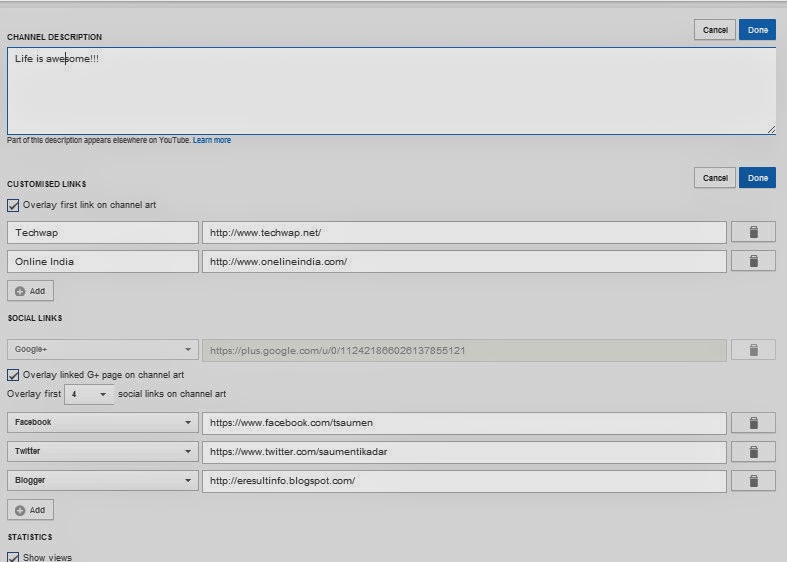
  • Click on Edit Links or go to "About" section .
  • Channel Description : Write a short paragraph about your YouTube Channel > Click Done. 
  • CUSTOMISED LINKS: Check the Overlay first link box. Now click on add button> enter your link title and URL. Click Done!
  • SOCIAL LINKS: Click Add> select social media > enter your social profile URL > Click Done!
you can add 20+ social media icon links just click drop down menu and select your desired social network. Google+ profile link already added so you don't need to add G+. 
Customize YouTube Channel
Hope its will be very helpful for someone. Any kind of problem please comment.

Poweramp v2.0.9 Music Player Full Version With Unlocker v2 for Android Apk Free Download

Poweramp music player is best most powerful android music player. Release new version v2.0.9 build 5.2.9 . Its fully  supported all format audio files plays mp3, mp4/m4a (incl. alac), ogg, wma, flac, wav, ape.separate powerful Bass and Treble adjustment,stereo eXpansion, mono mixing, balance, cross fade, ,replay gain
plays songs from folders and from own library
dynamic queue
lyrics support, including lyrics search via musiXmatch plugin
embed and standalone .cue files support
support for m3u, m3u8, pls, wpl playlists
OpenGL based cover art animation
Poweramp v2.0.9 Music Player
  • Powerful Equalizer


Powerful Equalizer
Powerful Equalizer
Install Note :
1. Install poweramp (Trial)
2.Now install poweramp unlocker. Done! enjoy full version.
Note:
sometime its popup a message like Google play license verify failed don't worry solution here...
1.Uninstall poweramp and unlocker > Restart phone> Install Again

IDM is registered with a fake serial Problem Solve Now and Use it Lifetime

Internet Download Manager is the most popular download manager, but main problem is its a 30days trail version. Some time we use Crack or patch but it still show a error message like "IDM is registered with a fake serial" what a trouble then crack again but after shutdown PC its come again and again "IDM is registered with a fake serial ". Forget it don't worry here is the solution for avoid IDM is registered with a fake serial its work perfect and you can use idm for lifetime without any error message.
Also you can use IDMPreactivated  for avoid register problem.

 IDM Fake Serial Problem Fix

  • First install a fresh latest version IDM next register/Crack/Patch.
  • Now go to the directory  “C:\Program Files \Internet Download Manager" and find out “IDMGrHlp.exe” rename it as you like.
IDM is registered with a fake serial Problem Solve
  •  Now find out "IDMBRoker.exe" Copy/paste it in same directory don't overwrite it simply paste it (idmBroker - Copy)
IDM is registered with a fake serial Problem Solve
  •  Last step now idmBroker -Copy or idmBroker 2 rename it "IDMGrHlp.exe" . Done!!

Happy download without any IDM error message trouble. Any kind of problem please leave a comment. 

GoDaddy Coupon Promo Code Generator Buy Domain Free or Lowest Cost Only $1

GoDaddy is the biggest and most popular domain sell provider, everyone want to buy domain from GoDaddy because they are largest domain provider and very good customer support. But main problem is their domain cost very high .COM 13$-14$/year. Sometime we can save few by coupon code but not recommended. If you want to buy domain @lowest cost then you can see the exclusive post only for you.Today I'll show you a great tricks GoDaddy Coupon Promo Code Generator. Here is more than 25+ coupon code apply  your demand.
 Lets Start...

 GoDaddy Coupon Promo Code Generator

GoDaddy Coupon Promo Code Generator
  • Now Go to GoDaddy Search your domain> Click Continue to checkout.
  • Click No Thanks
GoDaddy Coupon Promo Code Generator
  •  Select for 1 year and click "Find Savings" bellow the page.
GoDaddy Coupon Promo Code Generator
  • Its automatically generate up to 25 coupon code.
GoDaddy Coupon Promo Code Generator
  •  Now see the magic your domain price only $1 Big savings ever some coupon code free of cost so check all 25 coupon code Recommended.
GoDaddy Coupon Promo Code Generator
 NOTE: This is safe and risk free its only collect all big saving coupon code from internet and generate it with your demand, its also work with Amazon, Ebay and 100+ others online eCommerce website. so.. friends buy your domain now @lowest price ever. 
its fully tested by me and working superb perfectly hope its also work with you check it out now and must comment if you fetch any problem I'm in online ........Stay Connect with me Facebook and Google+

Social Profile Blogger Gadget With Hover Effect

Add a beautiful Social Profile Blogger Gadget With Hover Effect. Include RSS Feed, Google Plus, Facebook and Twitter Button. Easy Customize and fast loading, adjust with all responsive blogger template.
You may also like Top ten seo friendly Blogger Template

Social Profile Blogger Gadget
Demo

 Social Profile Blogger Gadget

  • Go to Blogger Layout.
  • Add a Gadget.
  • Select HTML/JavaScript.
Copy /paste Bellow Code save.

<style>
#social-hover {
float: right;
position: relative;
height: 40px;
}
#social-hover a{
font-family: 'Open Sans', Helvetica, Arial, sans-serif;
width: 40px;
transition:width 0.4s;
-webkit-transition:width 0.4s;
-moz-transition:width 0.4s;
}
#social-hover a:hover{
width: 115px;
}
#social-hover ul, #top-menu ul { margin: 0; }
#social-hover li,
#social-hover li a,
#social-hover li .ts-icon,
#social-hover li .ts-text {
display: block;
position: relative;
width: 40px;
height: 40px;
}
#social-hover li,
#social-hover li a,
#social-hover li .ts-text {
float: left;
width: auto;
overflow: hidden;
}
#social-hover li a {
width: 40px;
line-height: 40px;
color: #FFF;
font-size: 12px;
font-weight: bold;
text-shadow: 1px 1px 1px rgba(0,0,0,0.3);
}
#social-hover li.ts-rss a { background-color: #F88F16; }
#social-hover li.ts-rss .ts-icon { background: url("https://blogger.googleusercontent.com/img/b/R29vZ2xl/AVvXsEjXsG3Xz6aXSCAUZovqvePWilT_nvzi65thKH1sY7L8uXBd0C6NWP5kexR9OyF_yYooXasriB7QxwzmcF0aJlY3Ejlb6SJXCyyN7gTumspCzG7wtluX700FkoQuL6OGTbQQv_lUHt20CbU/s16/rss.png") no-repeat center center; }
#social-hover li .ts-icon { float: left; }
#social-hover li.ts-facebook a { background-color: #3B5998; }
#social-hover li.ts-facebook .ts-icon { background: url("https://blogger.googleusercontent.com/img/b/R29vZ2xl/AVvXsEhPV61W1Q8QB14nU_PKEgvGg0aY05NxS1NfcEW2ieH-BN5r23vfVj3tUqvkT3bxzJYiwUUikVxvZGPygweChn3jUiicK_bkXTrAksIRLLMb9fSSPMpymNAYPq3wsoEIa3e2kb2wj4msKpU/s16/facebook.png") no-repeat center center; }
#social-hover li.ts-twitter a { background-color: #3CF; }
#social-hover li.ts-twitter .ts-icon { background: url("https://blogger.googleusercontent.com/img/b/R29vZ2xl/AVvXsEg90Zt0agTOZ8H1hsOIsnanNYbHQZri1x8Gmj4r4JOF0kYKaMqcCXSkenZ07TWdpUobIy8dm6dAlvEUx3aw7v1sQNfD6-Xifymxrv5AwYyb6NGr_o_P5bbz-ajpMY_E865pVmAtkDqxRyI/s16/twitter.png") no-repeat center center; }
#social-hover li.ts-gplus a { background-color: #BD3518; }
#social-hover li.ts-gplus .ts-icon { background: url("https://blogger.googleusercontent.com/img/b/R29vZ2xl/AVvXsEjhXsT_sNt27k3IGtljV8QGfdfNiUKTyyETzc4OoYFdZJTD5C5KxFGQhrd0yrZ7izwxb94uNF7d2Roq5oIg0I-0eYT2FJFAc-xBUYRO6CcAC2RSIcWWrw9VYIXtYwWM4QLDxLQiFA0BeBM/s16/gplus.png") no-repeat center center; }
</style>
<div id="social-hover">             
<ul>   
<li class="ts-rss"><a href="http://feeds.feedburner.com/Techwap" rel="nofollow" target="_blank"><div class="ts-icon"></div><div class="ts-text">RSS Feeds</div></a></li>         
<li class="ts-facebook"><a href="https://www.facebook.com/tech2daynews" rel="nofollow" target="_blank"><div class="ts-icon"></div><div class="ts-text">Facebook</div></a></li>
<li class="ts-twitter"><a href="https://twitter.com/Techplus24" rel="nofollow" target="_blank"><div class="ts-icon"></div><div class="ts-text">Twitter</div></a></li>
<li class="ts-gplus"><a href="https://plus.google.com/+SaumenTikadar/about" rel="nofollow" target="_blank"><div class="ts-icon"></div><div class="ts-text">Google+</div></a></li>                 
</ul>             
</div>
 Replace all red mark your own id.

Happy 15th Birthday Google wishes a very happy birth day

Happy Birth day Google Doodle. 1998-2013 wishing lots of success. In 1996 two student of Standford university "Larry Page and sergey brin they make a search engine “BackRub” after that in 1997 they start new company "Google" came from Googol. Here is a first Google Search Page 1998.
Google 1998
Google 1998


In 1998, 4th September Google build a  incorporation, after 3days 7th September officially lunched Google and the .Com domain added in 1998,15th September.Google celebrate their birthday since 2006,27th September and today 2013,27th September Google's 15th Birthday. 
Happy 15th Birthday Google
 Now they have lots of services such as Google plus, Gmail, Maps, Translate, YouTube, Play Store for Android, Drive, Nexus, Adsense, Search engine optimization and more popular products which come from Google.
Well now internet mean Google they are no 1 in Alexa web-rank.
 Well hope that Google's will give us more attractive products in future, and we are wishes a very happy birth day.


India`s "Google boy" Kautilya from Karnal Haryana

A little boy only six years old, this little  genius from Karnal,Haryana is blessed with an extraordinary talented mind.Ask him any question and he will be ready with the correct answer just a few second. Today in Zee News studio Kautilya answered all kind of question its unbelievable, if you don't believe that then you can see full interviews of Kautilya by zee news.
Indian Google Boy
Indian Google Boy
 Watch now on YouTube
According to Zee news, this child knows all the facts about all the countries of the world. 
A small village of Haryana, Kohand resident Google genius kid studies in class 1st. He has the brain of a much older person.
 When asked why he learnt all the facts, he innocently replied that if hadn’t learnt all these he would have been ashamed when unable to reply
 He knows area-wise geographical distribution of land on earth. How much area each country is spread in? Seas, rivers, mountains, continent, planets, he knows about all by heart.
He does not take help of any book for reference.
Google boy kautilya
Google Boy Kautilya
Population figure of India, surrounding countries of India, languages spoken in different countries, he gave the exact answer to all questions. He has learnt all by rote.
His grandfather is his best friend. Like all other children of this age, he is curious to know new facts. 
Google Boy Kautilya
Google Boy Kautilya


Publish Blog Post From Mobile Blogger For Android and iPhone

Now instantly publish your blog post or save post as draft from your Mobile by blogger Android, iPhone app. Also can attach photos from your camera or select from your photo gallery by the Blogger app. Share your blog post all the Social Network include Google+, Facebook, Twitter. Share your location blog post, select your location from my location and add it to your post.
Publish Blog Post From Mobile

 How to Publish Blogger Post From Mobile

Enjoy Blogging From your mobile anywhere you go stay connected with Blogger.

Check Your Blog Page Speed Loading Time by Google PageSpeed

Now page loading speed time is the one of the main fact of Search engine Optimization. A good page speed loading website, blog help to increase Boost Traffic also improve High Page Rank. So we try to make a faster page speed loading blog for better SEO . Here is a very effective way to check page speed and analyze website,blog by Google Page Speed. Here you can see easily your Blog page speed in both device Desktop and Mobile also get suggestion of your page analyze.
Check Your Blog Page Speed

Google PageSpeed Insights Analyze and Optimize

Check Your Blog Page Speed

Here is my page speed in Desktop is 86 and Mobile 79. Bellow you can see the Suggestions of your page optimize.
  • Render Blocking JavaScript and CSS
  • Browser Caching
  • Optimize Images
  • Minify JavaScript
  • Minify HTML
  • Minify CSS
  • Landing Page Redirect
  • Server Response Time.

Understand Rule Icon

  • Red icon mean : issues found , Fix them.
  • Green icon mean : No issues found, Good performance.
Any kind of problem please leave a comment, have a good time and keep visiting.

Add a BuzzBoost Recent Post Blogger Widget by Google Feedburner

Now you can easily add a Google feedburner recent post widget for your blog by BuzzBoost. Its very fast loading widget easy to use,simple and awesome look.You can share your post any others blogs just copy BuzzBoost JavaScript code paste it anywhere you want such as others blogs or own blog. BuzzBoost gives you a snippet of JavaScript you can paste into your page templates also you can promote your Blog on another blog.
Live Demo of  BuzzBoost Recent Post Blogger Widget
BuzzBoost Recent Post Blogger Widget

How to add a BuzzBoost Recent Post Blogger Widget

BuzzBoost Recent Post Blogger Widget
  • Click on Publicize> Click on Buzzboost
  • Feed Setting, Customize your setting as you like
  1. Number of items to display (How many post you want to see)
  2. Open Links in (Same window or new window as you like)
  3. Your feed title
BuzzBoost Recent Post Blogger Widget

Recent Post Blogger Widget

  •  Save your settings.
  • Now copy the following Script.
  • Go to Blogger Dashboard> Layout> Add a Gadget> Select HTML/JavaScript>Paste here> Save>Now visit your blog to see the new Recent Post.
  • Also you can add the widget direct from BuzzBoost> Select Blogger>Click on Go
BuzzBoost Recent Post Blogger Widget
 Almost Done!! any kind of problem please leave a comment have a good time and keep visiting.


How to use Keyword Planner Step by Step With Images

Keyword research is the most important part of SEO, keyword can make a good content and a content can give us Boost Traffic in blog. Google's all others webtool such as Webmaster Tool, Analytic Tool and Keyword Planner all of those tools are very helpful for Search Engine Optimization. We need to proper use of these tool. 
The Keyword Tool has changed now its keyword planner with some new features such as ad group ideas, Keyword filters, Avg .Cpc, Include search trends, Targeting Option and some few changes like Local monthly searches and global monthly searches has been replaced, Ad Share option not available and the extracted from webpage option is not available in Keyword planner . So now we can fetch some few problems with the new keyword planner tool. Here is full tutorial of Keyword Planner for new user.
Keyword Planner
Keyword Planner

  How to use Keyword Planner  Step by Step

Keyword Planner
Keyword Planner
  • Enter your keyword in the following box.
  • Enter Your website url in the Landing Page box or leave it by default
  • Choose your keyword category from the product category box
  • You can set your location from the targeting all location option
  • Select your Language or leave it by default all language
  • You can set others search engine or leave it default Google.
  • Now click Get ideas.
  • You can also upload your keyword file ( Only CSV Format)  Option 2.
Keyword Planner
Keyword Planner

  • Browse your csv file and click Get estimates.
 Here is keyword planner ad group ideas,my keyword is Blogger here is the ideas of Blogger. You can see all relevance keyword by click any keyword.
  • Ad Group (keyword search result)
  • Keyword: blogger related all keywords.
Keyword Planner
Keyword Planner

  • In next  you can see a small box move over your mouse  you can see the search trends.
Keyword Planner
Keyword Planner

  • Next Total Monthly search and next the keyword competition. Its help us to find out best keyword for better SEO.
  • Avg CPC is your keyword add cpc.
Hope its will be help for new on Keyword Planner. Any kind of problem please leave a comment and keep visiting.


Download Apk apps Direct to PC by Real Apk Leecher

Google play store is the biggest android apps market place. Generally always we download android apps from Play store by Mobile. Play store only work with smartphone. Here is a easy method to Download apk apps direct  to your PC by Real Apk Leecher and no need to any Google play id or Device Id it's very easy and simple.
Download Apk apps Direct to PC by Real Apk Leecher
  • First you need Java if you don't have then first download it here Java For Windows
  • Now Install Java.
  • Now Create a Folder in C Drive and rename it apk_apps .
Download Apk apps Direct to PC by Real Apk Leecher
Real apk leecher
Apk apps Direct to PC by Real Apk Leecher
  • Now Select app> Right Click> Download This App .

Download Apk apps Direct to PC by Real Apk Leecher
Apk apps Direct to PC by Real Apk Leecher
  • Your app Downloading when your download will be complete then open apk_apps folder from C Drive which you create first time okay your all downloaded apps will be here apk_apps folder.

Enjoy unlimited Apk apps download to your PC. Any problem please leave a comment happy downloading and keep visiting. 

Analytics Google Tools Webmaster

Google Analytic is a powerful webmaster web tool its  show us total Traffic, Clicks and what types of search keywords used to find out your website content.  Search terms where Google offered your site even though they don't see a perfect match.  Google always displayed your site for that keyword or search term as a suitable match even the word is not listed in Webmaster Tools as even being on your website.
 Google  Analytics
 Google  Analytics

 Analysis Tool

Google Analytics is a one of the best powerful web master tool. You can easily add or customize data by Analytic Tool.  Google Analytics
 Analytics Google Tools Webmaster
 Analytics Google Tools Webmaster
 
  • Content Analytics 
Content Analytics help you to find out which parts of your Website/Blog are important and which pages are most popular so you can create a better content for your visitors.  
     Analytics Google Tools Webmaster
     Analytics Google Tools Webmaster
  • Social Analytics 
You can analyze you website social media program easily by Social Analytics . Add social sharing button like Google+, Twitter, Facebook and share your content social network.
 Analytics Tool
 Analytics Tool

  • Mobile Analytics
Mobile Analytic help to build up mobile app such as iOS, Android.
  • Advertising Analytics 
Improve your Advertising performance by Advertising Analytics .Make  your advertising  and link with your website.


What is Google Webmaster Google webmaster tool

Google webmaster is a free webmaster tool service of Google. Which provide some important Search engine optimization service for webmasters such as webmaster tool, Google analytic, Submit Sitemap Google, Google index, Crawl, Crawl Errors, Search Queries, Internal Links, Blocked Urals, Search Appearance, Data Highlight, Site Dashboard and Site Messages.
What is Google Webmaster Google web master tool

Google Webmaster Tool

Here we can see website full details post indexing status, Traffic and search keyword and more important information about website search performance. Here is full detail of Google webmaster tool.
https://www.google.com/webmasters/tools
  • Site Dashboard
It has a Site Dashboard for every website and blog. First we need to add a site Google automatically add Blogger Blogs to their site dashboard others website add manually by add a site. Site dashboard is a webmaster tool’s home page here we can see all Current and important status of a website or blog such as Crawl errors, Search Queries and Sitemaps.
What is Google Webmaster Google web master tool
 Google web master tool

  • Crawl errors
When googlebot crawl your website if googlebot found site errors and URL errors then here you can see total site and URL errors. In site errors such as DNS, Server Connectivity and Robots.txt fetch. In URL Errors you can see Server Error, Not Found and Others Errors. You can fix those errors by click Fix as Errors.
  • Search Queries
Here you can see Top Search Queries, Top Pages, Impressions and Clicks of your site. What kind of keywords use to search and top keyword query also your keyword Impressions, CTR, Avg.position and more.
What is Google Webmaster Google web master tool
Google web master tool

  • Sitemaps
A sitemap help to submit and index your total webpage and post. Here you can see how many URLs submitted and indexed. But first you need to Submit a sitemap to Google webmaster.
  • Internal Links
Here you can see your target pages and Internal Links of your website.
  • Google Index Status
Total how many pages Indexed Google. You can see how many URLs Blocked by Robots in Advanced option. You can also Index your new page https://www.google.com/webmasters/tools/submit-url
  • Content Keywords
 Google web master tool
Here you can see your post content keywords and  Significance.
  • Google Analytics Tool
Google Analytics is a powerful Data analyze, Customize Tool and easy to use. You can also analyze your content, social, mobile, Advertising and more.




Find out fake facebook profile picture

Check it first when you sent and accept any friends request that the profile picture is fake or original.
Always we sent request some good looking girls on Facebook but There are most of these account are fake.Here is a working process to find out a fake Facebook profile picture by Google Image search.
Also see my previous post Who visited my Facebook profile  and Find out your Facebook friends hide email id.

Find out fake facebook profile picture

For Example here is a Facebook profile (Puja Pal)
Find out fake facebook profile picture
  • First Open any Facebook profile which you want check.
  • Download Profile Picture.
  • Go to  https://www.google.co.in/imghp
  • Now click on camera icon from Google image search box.
Find out fake facebook profile picture

  • Select Upload an Image Browse from your hard drive which you download.

Find out fake facebook profile picture
  •  Now you can see the search result like that..
Find out fake facebook profile picture

Here is more than 1000 + search result for same image.
Okay friends now check fake profile picture easily. If you fetch any problem then please leave a comment.Have a good time and keep visiting.

Gmail Notifier Pro 5.1.2 full version free Download

Gmail Notifier pro is a very useful windows application. You can use and check multiple Gmail accounts display new mail notifications  also  Google News rss feeds, Google Drive notification, Google+ notification, Facebook Notification, Twitter, Microsoft SkyDrive, Feedly and RSS/Atom feeds.Gmail Notifier Pro is the best Windows Software mail notification desktop application.
Gmail Notifier Pro 5.1.2

 Feature

  • Gmail Notifier:You can check multiple gmail accounts its saports  booth Atom and IMAP.
  • Facebook: friend requests, status and stream updates. 
  • Twitter: Get the latest Tweets notification
  • Google+: Get notifications from Google Plus
  • Yahoo mail: Get email notifications for multiple yahoo accounts.
  • Google Drive
  • Google Calender
  • Google News RSS feeds.

Gmail Notifier Pro 5.1.2

 Gmail Notifier Pro Install and How to use

  •  Install GmailNotifierPro.  
  • Quit the program. 
  • Replace the file "ConfigData.XML" located in [C:\Users\Username\AppData\Roaming\GmailNotifierPro] with the one provided.
  •  If prompted for registration use the data from key file.
  • Now open Gmail Notifier>Click Manage Accounts>Click Add>Now Select your account type Which you want to use>Enter ID and Password OK.
Gmail Notifier Pro 5.1.2
  • If you want to use multiple accounts then add your account as same process.
File Size: 7 MB
Full Windows 7 and Windows 8.1 ,8support
Supports 32-bit & 64-bit Windows XP, Windows Vista.

Any kind of problem please leave a comment. Have a good time and keep visiting

.