Customize Change Blogger BlockQuote Style

This tutorial specially for all my blogger lover,well today we will learn how to customize blogger blog block quote with stylish css effect notepad style quote. If you don't know what is block quote, where can we use quote? etc. well the answer is, some time we use some code like HTML, CSS, JavaScript in blogger post then we put the code in Blockquote its a style.
You can use many different quote style as you like you will just need source code. Here is a  notepad style quote code, you can use it if you like. Take a look
Blogger BlockQuote Style

How to customize Blockquote in blogger blog

  • Go to Blogger dashboard > Template> Edit HTML
  • Search .blockquote  Or .blockquote p or any more just  Delete it.
  • Now Search ]]></b:skin> 
  • Copy below code and paste it ]]></b:skin> 
  • Save your template.
.code2{overflow:auto;width:500px;height:auto;font-family:"Consolas","Courier New",Courier,mono,serif;margin:15px 35px 15px 15px;padding:10px 10px 10px 60px;clear:both;color:#000;list-style-type:none;background:#f5f3f3 url(https://blogger.googleusercontent.com/img/b/R29vZ2xl/AVvXsEhtWX6nSswmAY0s0BcFTeh39RTMM8DAd8gFEN6lFHzrsyKD5e4Kta5C58uDJ3yFRk6Ix-WTHC3CLpP5JQKyYjvOFLT4xo_y6voxka9QTVqYr1Wil-q28-IEAYbxXtjdFrDPBqD07UgwcjkD/s1600/notepad1.gif) repeat-y top left;border:1px solid #ccc;border-right:15px solid rgba(0,0,0,.1);-webkit-transition:all .3s ease-in-out;-moz-transition:all .3s ease-in-out;-o-transition-duration:all .3s ease-in-out;transition:all .3s ease-in-out;-webkit-border-radius:3px;-moz-border-radius:3px;border-radius:3px;-webkit-box-shadow:0 0 10px rgba(0,0,0,.3);-moz-box-shadow:0 0 10px rgba(0,0,0,.3);box-shadow:0 0 10px rgba(0,0,0,.3)}.code2:hover{overflow:auto;width:500px;height:auto;background:#f5f3f3 url(https://blogger.googleusercontent.com/img/b/R29vZ2xl/AVvXsEhtWX6nSswmAY0s0BcFTeh39RTMM8DAd8gFEN6lFHzrsyKD5e4Kta5C58uDJ3yFRk6Ix-WTHC3CLpP5JQKyYjvOFLT4xo_y6voxka9QTVqYr1Wil-q28-IEAYbxXtjdFrDPBqD07UgwcjkD/s1600/notepad1.gif) repeat-y top left;border:1px solid #ccc;border-right:15px solid rgba(0,0,0,.1);-webkit-box-shadow:0 0 10px rgba(0,0,0,.3);-moz-box-shadow:0 0 10px rgba(0,0,0,.3);box-shadow:0 0 10px rgba(0,0,0,.3)}


  • Now create a new post in HTML
  • Use this tag <div class="code2"> YOUR TEXT/CODE HERE </div>
  •  Publish your post and visit your blog to see the changes.

Customize

  • You can change quote box width you just need to change the size width:500px as you like ,recommended set size same as your blog post body size. if your  post body size width:600px then set the quote box width size 500px its look perfect. Any kind of problem please leave a comment.
     

GoDaddy Coupon Promo Code Generator Buy Domain Free or Lowest Cost Only $1

GoDaddy is the biggest and most popular domain sell provider, everyone want to buy domain from GoDaddy because they are largest domain provider and very good customer support. But main problem is their domain cost very high .COM 13$-14$/year. Sometime we can save few by coupon code but not recommended. If you want to buy domain @lowest cost then you can see the exclusive post only for you.Today I'll show you a great tricks GoDaddy Coupon Promo Code Generator. Here is more than 25+ coupon code apply  your demand.
 Lets Start...

 GoDaddy Coupon Promo Code Generator

GoDaddy Coupon Promo Code Generator
  • Now Go to GoDaddy Search your domain> Click Continue to checkout.
  • Click No Thanks
GoDaddy Coupon Promo Code Generator
  •  Select for 1 year and click "Find Savings" bellow the page.
GoDaddy Coupon Promo Code Generator
  • Its automatically generate up to 25 coupon code.
GoDaddy Coupon Promo Code Generator
  •  Now see the magic your domain price only $1 Big savings ever some coupon code free of cost so check all 25 coupon code Recommended.
GoDaddy Coupon Promo Code Generator
 NOTE: This is safe and risk free its only collect all big saving coupon code from internet and generate it with your demand, its also work with Amazon, Ebay and 100+ others online eCommerce website. so.. friends buy your domain now @lowest price ever. 
its fully tested by me and working superb perfectly hope its also work with you check it out now and must comment if you fetch any problem I'm in online ........Stay Connect with me Facebook and Google+

Social Profile Blogger Gadget With Hover Effect

Add a beautiful Social Profile Blogger Gadget With Hover Effect. Include RSS Feed, Google Plus, Facebook and Twitter Button. Easy Customize and fast loading, adjust with all responsive blogger template.
You may also like Top ten seo friendly Blogger Template

Social Profile Blogger Gadget
Demo

 Social Profile Blogger Gadget

  • Go to Blogger Layout.
  • Add a Gadget.
  • Select HTML/JavaScript.
Copy /paste Bellow Code save.

<style>
#social-hover {
float: right;
position: relative;
height: 40px;
}
#social-hover a{
font-family: 'Open Sans', Helvetica, Arial, sans-serif;
width: 40px;
transition:width 0.4s;
-webkit-transition:width 0.4s;
-moz-transition:width 0.4s;
}
#social-hover a:hover{
width: 115px;
}
#social-hover ul, #top-menu ul { margin: 0; }
#social-hover li,
#social-hover li a,
#social-hover li .ts-icon,
#social-hover li .ts-text {
display: block;
position: relative;
width: 40px;
height: 40px;
}
#social-hover li,
#social-hover li a,
#social-hover li .ts-text {
float: left;
width: auto;
overflow: hidden;
}
#social-hover li a {
width: 40px;
line-height: 40px;
color: #FFF;
font-size: 12px;
font-weight: bold;
text-shadow: 1px 1px 1px rgba(0,0,0,0.3);
}
#social-hover li.ts-rss a { background-color: #F88F16; }
#social-hover li.ts-rss .ts-icon { background: url("https://blogger.googleusercontent.com/img/b/R29vZ2xl/AVvXsEjXsG3Xz6aXSCAUZovqvePWilT_nvzi65thKH1sY7L8uXBd0C6NWP5kexR9OyF_yYooXasriB7QxwzmcF0aJlY3Ejlb6SJXCyyN7gTumspCzG7wtluX700FkoQuL6OGTbQQv_lUHt20CbU/s16/rss.png") no-repeat center center; }
#social-hover li .ts-icon { float: left; }
#social-hover li.ts-facebook a { background-color: #3B5998; }
#social-hover li.ts-facebook .ts-icon { background: url("https://blogger.googleusercontent.com/img/b/R29vZ2xl/AVvXsEhPV61W1Q8QB14nU_PKEgvGg0aY05NxS1NfcEW2ieH-BN5r23vfVj3tUqvkT3bxzJYiwUUikVxvZGPygweChn3jUiicK_bkXTrAksIRLLMb9fSSPMpymNAYPq3wsoEIa3e2kb2wj4msKpU/s16/facebook.png") no-repeat center center; }
#social-hover li.ts-twitter a { background-color: #3CF; }
#social-hover li.ts-twitter .ts-icon { background: url("https://blogger.googleusercontent.com/img/b/R29vZ2xl/AVvXsEg90Zt0agTOZ8H1hsOIsnanNYbHQZri1x8Gmj4r4JOF0kYKaMqcCXSkenZ07TWdpUobIy8dm6dAlvEUx3aw7v1sQNfD6-Xifymxrv5AwYyb6NGr_o_P5bbz-ajpMY_E865pVmAtkDqxRyI/s16/twitter.png") no-repeat center center; }
#social-hover li.ts-gplus a { background-color: #BD3518; }
#social-hover li.ts-gplus .ts-icon { background: url("https://blogger.googleusercontent.com/img/b/R29vZ2xl/AVvXsEjhXsT_sNt27k3IGtljV8QGfdfNiUKTyyETzc4OoYFdZJTD5C5KxFGQhrd0yrZ7izwxb94uNF7d2Roq5oIg0I-0eYT2FJFAc-xBUYRO6CcAC2RSIcWWrw9VYIXtYwWM4QLDxLQiFA0BeBM/s16/gplus.png") no-repeat center center; }
</style>
<div id="social-hover">             
<ul>   
<li class="ts-rss"><a href="http://feeds.feedburner.com/Techwap" rel="nofollow" target="_blank"><div class="ts-icon"></div><div class="ts-text">RSS Feeds</div></a></li>         
<li class="ts-facebook"><a href="https://www.facebook.com/tech2daynews" rel="nofollow" target="_blank"><div class="ts-icon"></div><div class="ts-text">Facebook</div></a></li>
<li class="ts-twitter"><a href="https://twitter.com/Techplus24" rel="nofollow" target="_blank"><div class="ts-icon"></div><div class="ts-text">Twitter</div></a></li>
<li class="ts-gplus"><a href="https://plus.google.com/+SaumenTikadar/about" rel="nofollow" target="_blank"><div class="ts-icon"></div><div class="ts-text">Google+</div></a></li>                 
</ul>             
</div>
 Replace all red mark your own id.

Check Your Blog Page Speed Loading Time by Google PageSpeed

Now page loading speed time is the one of the main fact of Search engine Optimization. A good page speed loading website, blog help to increase Boost Traffic also improve High Page Rank. So we try to make a faster page speed loading blog for better SEO . Here is a very effective way to check page speed and analyze website,blog by Google Page Speed. Here you can see easily your Blog page speed in both device Desktop and Mobile also get suggestion of your page analyze.
Check Your Blog Page Speed

Google PageSpeed Insights Analyze and Optimize

Check Your Blog Page Speed

Here is my page speed in Desktop is 86 and Mobile 79. Bellow you can see the Suggestions of your page optimize.
  • Render Blocking JavaScript and CSS
  • Browser Caching
  • Optimize Images
  • Minify JavaScript
  • Minify HTML
  • Minify CSS
  • Landing Page Redirect
  • Server Response Time.

Understand Rule Icon

  • Red icon mean : issues found , Fix them.
  • Green icon mean : No issues found, Good performance.
Any kind of problem please leave a comment, have a good time and keep visiting.

570 high page rank social bookmarking sites list 2013

If you want to get more traffic and visitors then you must need to do Social Bookmarking of your blog post with some high page rank websites.  Here is more than 570 high page rank social bookmarking sites list 2013 bookmarks your blog now by visit each website sign up first if require and bookmarks your blog post.
social bookmarking sites list 2013
Social Bookmarking

  • Social Bookmarking sites list 2013  high page rank

 http://www.reddit.com 8
http://digg.com 8
http://delicious.com 8
http://www.folkd.com 7
http://www.mister-wong.com 7
http://www.diigo.com 7
http://www.mixx.com 7
http://multiply.com 7
http://www.diigo.com 7
http://www.folkd.com 7
http://www.bibsonomy.org 7
http://www.designfloat.com 6
http://www.kwoff.com 6
http://bignet.biz 6
http://www.dropjack.com 6
http://www.propeller.com 6
http://www.linkagogo.com 6
http://faves.com 6
http://www.jumptags.com 6
http://www.social-bookmarking.net 5
http://www.maple.nu 5
http://tipd.com 5
http://metamusica.com.br 5
http://www.searchles.com 5
http://www.backflip.com 5
http://www.theviraltrend.com 5


Artisteer 4.1 Full Activate Create Professional Blog Template

Today I’ll share with you  professional blogger template creator software Artisteer 4.1. You can easily create your own blog template like Blogger, Wordpress, Joomla, Drupal by Artisteer You don't need to learn Photoshop, CSS, HTML, PHP  and other Web technologies to create great looking designs, including images and buttons it’s very simple and easy to use.

Artisteer 4.1
Artisteer 4.1
 Here is some features of Artisteer
  •  Create blogger template
  • Create Joomla template
  • Create Wordpress template
  • You can find here cool Web design ideas.
  • Adjust generated designs to create great looking Web and Blog templates.
  • Create perfectly correct, validated HTML and CSS that conform to Web standards.
  • You don't need to learn Photoshop, CSS, HTML and other Web technologies to create great looking designs, including images and buttons. 
Install and Activate
  •  First download artisteer setup from artisteer official website
  • Download artisteer keygn file here Artisteer Key 
  • Now install it normaly when install will be complete then don't open it click quite.
  • Now open keygn file> Select Standard Edition >Click on Patch>Open install directory where you install artisteer>Select bin folder>OK.  see below screen shot.
  • Install directory like that   C:\Program Files (x86)\Artisteer 4

Artisteer 4.1 Key
Artisteer 4.1 Key
  •  Now it's will be show patch successfully
Artisteer 4.1 Key
Artisteer 4.1 Activator

  •  Now click Generate
Artisteer 4.1 Activator
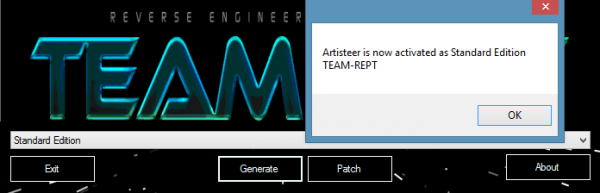
  • Yeah Artisteer is now activated. Now open Artisteer and enjoy it full version.
Here is a screen shot of artisteer blog template
Artisteer 4.1
Artisteer 4.1
If you fetch any problem feel free to leave a comment. Keep visiting have a good time.